

When starting a new Power BI project today, setting up separate Development, Test, and Production workspaces connected through a Deployment Pipeline is considered a best practice. It provides a structured development process, reduces risks, and makes collaboration between developers much easier.
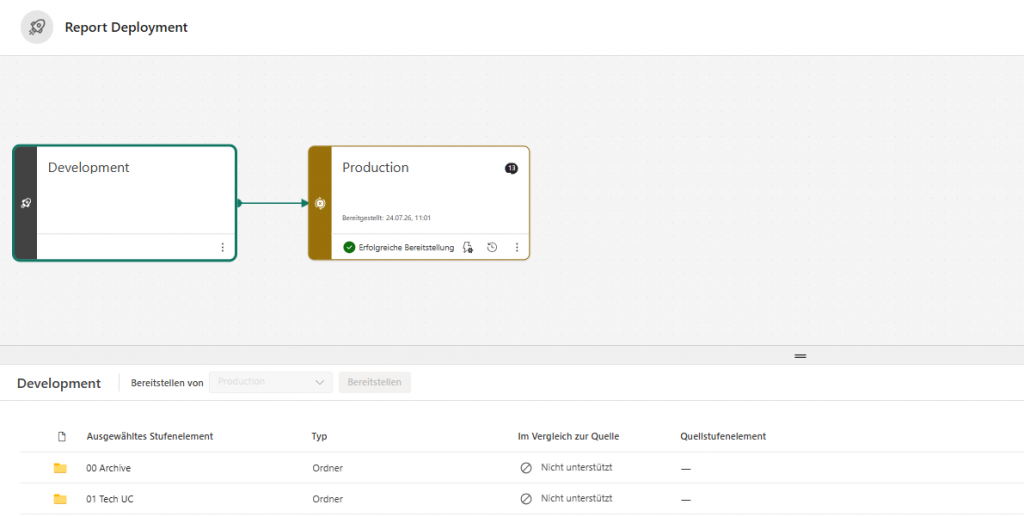
However, not every project starts that way.
Sometimes a solution grows organically, deadlines take priority, and technical governance is introduced later. This was exactly the situation I recently encountered in one of my projects.
Rather than building a new reporting platform from scratch, the challenge was to professionalize an existing environment that had already been in productive use for over a year.
This article describes the migration strategy, the challenges encountered, and an interesting behavior of Deployment Pipelines regarding report pairing.
The Initial Situation
The reporting solution had been developed directly inside a single Production workspace.
This workspace was already connected to the organization’s Power BI App, from which business users consumed all reports.
The architecture looked like this:

Power BI App
      │
      ▼
Production Workspace
      │
      ├── Report A
      ├── Report B
      ├── Report C
      └── ...
While this setup worked operationally, it introduced several long-term disadvantages:
- Development took place directly in Production.
- Every report modification immediately affected the production environment.
- There was no controlled deployment process.
- Collaboration between developers became increasingly difficult.
- The architecture accumulated technical debt over time.
As the number of reports continued to grow, it became clear that a more professional development lifecycle was required.
Target Architecture
The objective was not to redesign the entire reporting platform.
Instead, the goal was to introduce modern development practices while minimizing the impact on existing users.
The desired architecture was:

Development Workspace
        │
        ▼
Deployment Pipeline
        │
        ▼
Production Workspace
        │
        ▼
Power BI App
The Production workspace would remain exactly where it was because it was already connected to the Power BI App.
Only a new Development workspace needed to be introduced.
From that point onward, the development process would follow a standard lifecycle:
- Develop reports in the Development workspace.
- Deploy changes through the Deployment Pipeline.
- Update the Power BI App.
This would significantly improve governance without disrupting existing report consumers.
Challenge 1: Replicating Existing Reports
The first challenge was straightforward.
The Development workspace needed to contain copies of all existing reports from Production.
The simplest approach turned out to be using the Save As option available in Power BI Service.
Each report was copied from the Production workspace into the newly created Development workspace.
At this point, the workspace contained identical reports.
However, a much more interesting challenge appeared when configuring the Deployment Pipeline.
Challenge 2: Report Pairing in the Deployment Pipeline
Deployment Pipelines automatically compare artifacts between workspaces.
To deploy changes correctly, the pipeline must determine which report in Development corresponds to which report in Production.
This process is commonly referred to as artifact pairing.
In my case, the reports were not paired correctly.
Although the reports had identical names and content, the Deployment Pipeline considered the reports in the Development workspace as completely new artifacts.
Conceptually, the pipeline interpreted the situation like this:
Development Workspace

Report A (new)
Report B (new)
Report C (new)

↓

Production Workspace

Report A
Report B
Report C

❌ No pairing established
Instead of updating the existing reports in Production, the pipeline would have attempted to publish new reports.
Why This Was a Problem
At first glance, publishing new reports may not seem problematic.
However, in a production environment, report identity matters.
If new reports were published:
- new report IDs would be created,
- report URLs would change,
- existing links embedded in the Power BI App would no longer reference the original reports,
- documentation and bookmarks could become outdated,
- users might need to receive new links.
For an environment with many business users, this introduces unnecessary disruption.
The objective was therefore clear:
Preserve the identity of the existing production reports while introducing a proper Development workspace.
The Solution
After some investigation, I found a surprisingly simple solution.
I disconnected the Deployment Pipeline and recreated the workspace bindings.
Once the workspaces were connected again, the Deployment Pipeline successfully paired the reports.
The result looked like this:
Development Workspace
       │
       │ paired
       ▼
Production Workspace

✔ Report A
✔ Report B
✔ Report C
From that point onward, deployments behaved exactly as expected.
The Production reports retained their identities, and all future development could follow the standard Dev → Prod deployment process.
Lessons Learned
This experience highlighted several interesting aspects of Power BI governance.
1. Introducing Best Practices Later Is Still Worth It
Not every project starts with a perfect architecture.
Introducing Deployment Pipelines after a solution has matured is absolutely possible and can significantly improve maintainability.
2. Report Pairing Is Critical
Deployment Pipelines rely on correctly pairing artifacts between workspaces.
If pairing fails, the deployment behavior may differ significantly from what is expected.
Understanding how Power BI identifies corresponding artifacts is therefore essential when modernizing existing environments.
3. Think Beyond the Technical Migration
Migrating reports is only one part of the challenge.
It is equally important to preserve the experience of business users.
Whenever possible, avoid changes that force users to update bookmarks, documentation, or report links.
Successful migrations are often the ones users never notice.
Final Thoughts
Deployment Pipelines are one of the most valuable capabilities available in Power BI for implementing professional application lifecycle management.
While they are commonly introduced at the beginning of a project, this experience showed that they can also be integrated successfully into an existing production environment.
The key is not only understanding how Deployment Pipelines work, but also understanding how Power BI manages report identities behind the scenes.
For me, this project was a good reminder that modernizing an existing solution is often more challenging than building a new one. The technical implementation is only part of the work—the real challenge is introducing better architecture while ensuring continuity for the users who depend on the platform every day.