
AI in Power BI is becoming much more interesting than simply asking questions about data or generating a DAX expression.
One of the capabilities I have recently been testing is Copilot directly inside the semantic model in Microsoft Fabric.
And this changes the interaction considerably.
Instead of copying a DAX formula into an external AI assistant, explaining the structure of the model, getting an answer and manually implementing it again in Power BI, Copilot can work directly next to the semantic model it needs to understand.
You can describe what you want in natural language, let Copilot analyze the existing model and use it to assist with actual modeling tasks.
It almost feels like „vibe modeling“ for Power BI.
But behind the funny expression is a potentially important change in how semantic models can be developed and maintained.
From AI Assistance to Model-Aware Assistance
There is a fundamental difference between asking a generic AI assistant:
„Write a DAX measure for year-over-year growth.“
and asking an AI assistant that has access to the context of your semantic model.
In the first case, I have to provide the context myself.
I may need to explain the tables, column names, relationships, existing measures and business logic before the generated DAX becomes useful.
With Copilot integrated into the semantic-modeling experience, the interaction is different.
I can start with something much broader, for example:
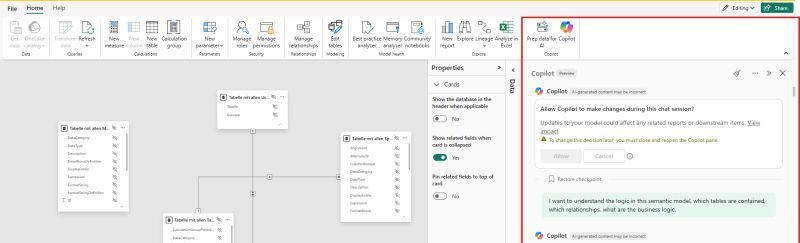
„I want to understand the logic in this semantic model. Which tables are contained, how are they related and what is the business logic?“
Copilot can reason within the context of the model rather than treating the question as an isolated DAX problem.
That contextual awareness is, for me, one of the most interesting parts of the experience.
What Can I Use It For?
During my experiments, I found several areas particularly interesting.
Copilot can support modeling activities around:
Relationships. It can help understand the existing relationship structure and support changes to how tables are connected.
DAX. Instead of generating formulas without context, Copilot can assist with measures while considering the existing model.
Calculated columns and calculated tables. These can also become part of the conversational modeling workflow.
Metadata. Table and column descriptions can be created or improved, which is particularly useful for larger enterprise semantic models and self-service BI.
Model understanding. Before modifying anything, I can ask questions about the model itself: its tables, relationships, calculations and structure.
Documentation. The conversation can also help explain and document what was changed and why.
The important point is that these activities are no longer completely separated from the semantic model.
The model itself becomes the context of the conversation.
A Different Development Workflow
A traditional modeling workflow might look something like this:
Understand requirement → inspect model → find the relevant tables → write DAX → create relationships → add metadata → test → document.
AI can now participate across several of those steps.
For example, I might explain a requirement in natural language and ask Copilot first to inspect the model.
Before writing anything, it can help me understand which existing tables and measures are relevant.
From there, I can refine the requirement and ask it to propose the necessary modeling changes.
This is much more useful than immediately generating code.
For me, the interesting workflow is:
Understand → propose → review → modify → validate.
Copilot accelerates the work between those steps, but the developer remains responsible for the architecture and the final decision.
Read-Only vs. Allowing Copilot to Make Changes
One detail in the current experience that I particularly appreciate is the explicit permission step.
When opening Copilot, I can decide whether I want it to make changes to the semantic model during the session.
That distinction is important.
There is a big difference between:
„Analyze my semantic model.“
and:
„Modify my semantic model.“
The first is primarily an AI reasoning problem.
The second introduces governance.
A generated DAX expression can be reviewed relatively easily. A change to a relationship, calculated column or another model object can potentially affect downstream reports and calculations.
Microsoft even makes this impact visible in the interface: changes to the model can affect related reports and downstream items.
That means AI-assisted modeling should not become synonymous with blindly accepting generated changes.
I would rather see Copilot as a modeling partner:
- Let it understand the requirement.
- Let it inspect the existing model.
- Ask it to propose an implementation.
- Understand the proposed changes.
- Allow the changes where appropriate.
- Validate the model afterwards.
This becomes even more important for enterprise semantic models.
Metadata Is an Especially Interesting Use Case
I recently wrote about using the Power BI Modeling MCP Server to audit an enterprise semantic model containing 69 tables, 1,083 columns and 433 measures.
One of the main objectives was improving metadata so that report developers could better understand the model.
Copilot directly within the semantic-model experience opens another interesting route for this type of work.
A semantic model should not only contain correct calculations. It should also communicate what those calculations mean.
If a report developer sees a measure called Active Customer, for example, the name alone may not answer important questions:
Does „active“ mean a transaction during the selected month?
Does it mean a customer with an active contract?
Are cancelled customers excluded?
A proper measure description can capture this context.
The same applies to tables and columns.
Using AI to help create and maintain that metadata directly within the modeling environment can significantly improve the usability of shared semantic models.
That ultimately supports something much bigger: self-service BI.
Copilot Does Not Remove the Need to Understand DAX
There is one point I consider particularly important.
Being able to ask Copilot to create a DAX measure does not mean that understanding DAX becomes unnecessary.
In fact, I would argue the opposite.
The easier it becomes to generate code, the more important it becomes to understand whether that code is correct.
Imagine Copilot generates:
Revenue Previous Year =
CALCULATE (
    [Revenue],
    SAMEPERIODLASTYEAR ( 'Calendar'[Date] )
)
The syntax may be perfectly valid.
But the developer still needs to ask:
Is the calendar table configured correctly?
Does the business actually want the previous calendar year?
How should incomplete periods behave?
What happens under the current filter context?
Does the calculation align with the business definition?
AI can accelerate implementation.
It does not own the business definition.
The Same Applies to Relationships
Relationships are even more sensitive.
Connecting two tables is technically easy.
Designing the correct semantic model is not.
Cardinality, filter direction, granularity and the intended analytical behavior all matter.
A relationship that appears logical based on column names can still produce incorrect results.
So when Copilot proposes or creates relationships, I still want to understand:
- Why these tables should be connected
- Which columns are being used
- What the cardinality should be
- How filters will propagate
- Whether ambiguity is introduced
- Which existing measures may be affected
This is where the role of the Power BI developer changes slightly.
Less time may be spent manually performing repetitive modeling actions.
More attention can be spent reviewing architecture and intent.
From Modeling UI to Conversational Modeling
Power BI semantic modeling has traditionally been highly UI-driven.
We create relationships visually.
We select objects from the model pane.
We write DAX in an editor.
We configure properties through menus.
None of that disappears.
But natural language is becoming an additional interface to the semantic model.
Instead of always navigating to the correct technical operation first, I can begin with the intention:
„Explain this model.“
„Create a measure that compares this KPI with the previous selected period.“
„Add descriptions to these business-facing columns.“
„Help me understand why these two tables are related.“
The AI then helps translate intention into modeling actions.
That is what makes the term vibe modeling somewhat appropriate.
But good vibe modeling still requires good engineering.
Copilot, TMDL, DAX UDFs and MCP
What makes this particularly interesting to me is that Copilot is not happening in isolation.
Several recent developments are changing how we interact with Power BI semantic models.
I have recently been experimenting with three of them.
TMDL gives us a textual representation of the semantic model and moves Power BI further toward a model-as-code approach.
DAX User-Defined Functions allow us to encapsulate recurring logic instead of maintaining dozens of almost identical measures.
Power BI Modeling MCP Server gives AI agents programmatic modeling capabilities through MCP.
And now Copilot directly inside the semantic model brings natural-language interaction directly into the Fabric modeling experience.
They solve different problems, but together they point in a similar direction:
Semantic modeling is becoming more programmable, more reusable and increasingly AI-assisted.
Where I Think This Becomes Really Valuable
For me, the most interesting use cases are not necessarily creating one simple measure.
Writing a SUM() measure manually is already fast.
The value increases when the model becomes larger and the task requires context.
For example:
- Understanding an unfamiliar semantic model
- Auditing existing business logic
- Creating related sets of measures
- Improving metadata systematically
- Explaining complex calculations
- Identifying relationships between model objects
- Supporting documentation
- Accelerating repetitive modeling tasks
This is particularly relevant in enterprise environments, where semantic models may have hundreds of measures and are maintained by several developers.
The challenge is often no longer how to create one calculation.
The challenge is understanding and maintaining the entire system around it.
So, Would I Let Copilot Modify a Production Semantic Model?
This is where I would still be cautious.
For exploration, development and repetitive modeling work, I see considerable potential.
For direct autonomous changes to a production semantic model, I would want strong controls around review, testing, permissions and deployment.
My preferred architecture remains:
Development → validation → controlled deployment → Production.
AI should make the Development stage dramatically more productive.
It should not eliminate the lifecycle around it.
This distinction becomes increasingly important as AI tools move from suggesting changes to actually executing them.
Final Thoughts
What excites me about Copilot inside the Power BI semantic model is not simply that it can write DAX.
We already have many ways of generating DAX with AI.
The more important change is context and action.
Copilot is sitting next to the model.
It can help understand the model, reason about it, support modeling operations and, when explicitly allowed, participate in making changes.
That brings us closer to a conversational development experience where I can describe what I want to achieve before worrying about every individual modeling operation required to implement it.
Will we really call this „vibe modeling“ in a few years? Probably not.
But the underlying idea is likely to stay:
Describe the intent. Let AI help with the implementation. Keep the developer responsible for architecture, business logic and validation.
That, for me, is a much more interesting future for AI in Power BI than simply generating another DAX formula.