
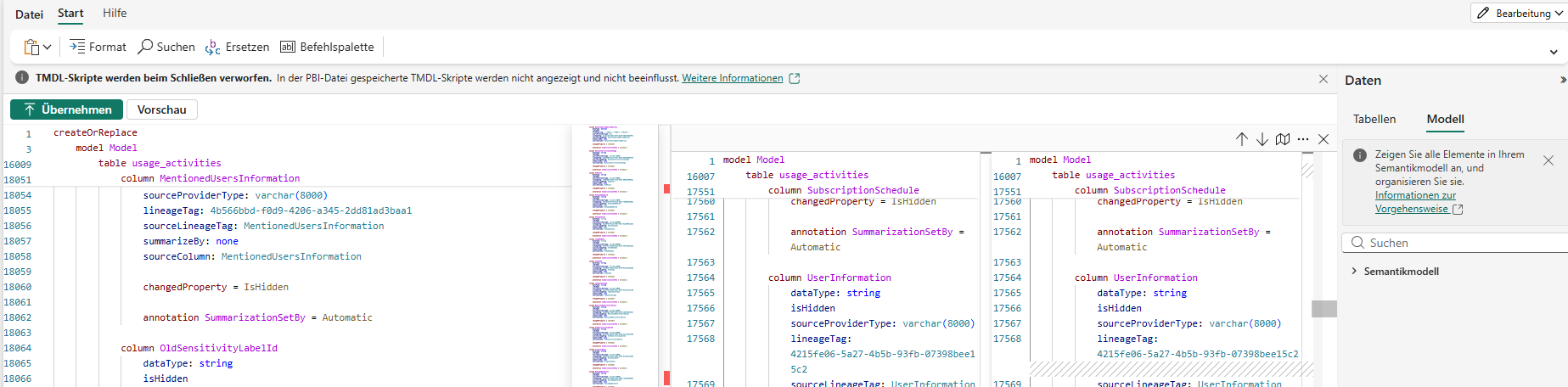
Microsoft Fabric continues to bring capabilities that were traditionally associated with external development tools closer to the native web experience.
One of the additions I have been particularly happy to see is support for TMDL – Tabular Model Definition Language – directly in the Fabric web experience.
At first glance, TMDL may look like another way of displaying the content of a semantic model. But technically, it represents something much more interesting: it gives developers a human-readable, code-based representation of the metadata that defines a semantic model.
And for larger enterprise semantic models, this can become extremely useful.
In this article, I want to explain what TMDL is, what information it exposes, and show one practical scenario where I have been using it for metadata validation and semantic model quality checks.
What is TMDL?
TMDL stands for Tabular Model Definition Language.
A Power BI semantic model is much more than a collection of tables and DAX measures. Behind the graphical model that we see in Power BI, there is a complete metadata definition describing the model.
This includes objects and properties such as:
- Tables
- Columns
- Measures
- Relationships
- Hierarchies
- Data types
- Format strings
- DAX expressions
- Descriptions
- Annotations
- Partitions
- Model properties
- Visibility settings
- Data categories
TMDL provides a textual representation of this metadata.
A simplified table definition can conceptually look like this:
table Sales

    column OrderDate
        dataType: dateTime
        formatString: Short Date

    column Revenue
        dataType: decimal

    measure 'Total Revenue' =
        SUM ( Sales[Revenue] )

        formatString: #,0.00

        description: Total revenue generated from sales
Instead of interacting only with the visual representation of the model, we can therefore inspect its underlying definition in a structured and readable format.
This is an important distinction.
TMDL is not DAX.
DAX defines calculations inside the model.
TMDL describes the model itself, including the objects that contain those DAX calculations.
From Visual Modeling to Semantic Model as Code
Traditionally, most Power BI developers interact with a semantic model through graphical interfaces.
If I want to inspect a measure, I select the measure.
If I want to check the description of a column, I navigate to the column.
If I want to inspect a relationship, I open the model view.
This works perfectly well for smaller models.
The situation changes when a semantic model contains dozens of tables, hundreds of columns and hundreds of measures.
Imagine that I want to answer a relatively simple question:
Do all important business measures have a description?
Through the graphical interface, I potentially need to navigate through a large number of objects individually.
With a textual representation of the model, I can approach the same problem differently.
I can search the model definition.
This changes the way I can inspect and validate a semantic model.
My Practical Use Case: Metadata Validation
This is actually one of the reasons why I became interested in using TMDL.
I am currently working with a relatively large enterprise semantic model.
As the model grows, metadata quality becomes increasingly important.
A measure such as:
[Revenue]
may be obvious to the developer who created it.
But six months later, another developer may have several questions:
- What exactly does Revenue represent?
- Which business definition is used?
- Are cancellations included?
- Is the measure gross or net?
- Who owns the KPI?
- Is there another similar measure that should be used instead?
This is where descriptions and other metadata become important.
A well-maintained semantic model should not only calculate the correct numbers.
It should also explain itself.
Checking Descriptions with TMDL
One of my current uses of TMDL is therefore very straightforward:
I use it to inspect whether important tables, columns and measures contain the expected descriptions.
For example, a measure definition may contain:
measure 'Total Revenue' =
    SUM ( Sales[Revenue] )

    formatString: #,0.00

    description: Total net revenue excluding cancelled transactions
The interesting part for my validation is:
description: Total net revenue excluding cancelled transactions
When reviewing a large semantic model, being able to search through its textual definition makes these checks considerably easier.
I can quickly investigate:
- Which important tables have descriptions?
- Which measures are documented?
- Which columns are missing documentation?
- Are naming conventions being followed?
- Are objects unexpectedly hidden?
- Are format strings configured correctly?
- Are properties consistent across similar objects?
This turns TMDL into a very useful tool for semantic model quality assurance.
TMDL Goes Beyond Documentation
Descriptions are only one example.
Once the model definition is exposed as TMDL, many other properties become visible.
For example:
column UserInformation
    dataType: string
    isHidden
    sourceProviderType: varchar(8000)
    sourceLineageTag: UserInformation
    summarizeBy: none
    sourceColumn: UserInformation
This tells us much more than simply the column name.
We can inspect properties such as:
Data Types
dataType: string
This can help identify unexpected or inconsistent data types.
Visibility
isHidden
Useful when validating which technical columns are exposed to report developers and end users.
Summarization
summarizeBy: none
This becomes relevant when checking default behavior for numeric and categorical columns.
Source Information
Properties related to source columns and lineage can provide additional information about where model objects originate.
Expressions
Measures expose their DAX definitions, allowing calculations and metadata to be reviewed together.
The semantic model can therefore be inspected at a much deeper level than simply checking table and column names.
Why This Matters for Enterprise Semantic Models
The value of this becomes clearer as semantic models become shared enterprise assets.
A small Power BI model might have:
10 tables
50 measures
1 developer
An enterprise semantic model may contain:
50+ tables
hundreds of columns
400+ measures
multiple developers
multiple reports
many business consumers
At this scale, semantic modeling becomes partly a governance problem.
Questions start appearing that go beyond whether the DAX calculation works:
- Are objects named consistently?
- Are important KPIs documented?
- Are technical columns hidden?
- Are formatting standards respected?
- Are deprecated objects still present?
- Are developers following the same modeling conventions?
Manually checking these requirements object by object does not scale particularly well.
A code representation of the model provides a much better foundation for systematic validation
TMDL and the Idea of Semantic Model as Code
This is probably the part I find most interesting.
The Power BI ecosystem is gradually moving towards development practices that are already common in software engineering and data engineering.
Instead of treating the semantic model exclusively as something configured through a graphical interface, we can increasingly treat its definition as code.
That has several implications.
A textual model definition is easier to:
- Search
- Compare
- Review
- Version
- Validate
- Generate
- Automate
This also makes semantic model development more compatible with concepts such as source control, code reviews and CI/CD.
TMDL and Git
The connection becomes particularly interesting when semantic models are stored using development-friendly project formats.
Text-based definitions work naturally with Git because Git can identify changes at the file and line level.
Suppose a developer changes a measure.
Instead of only knowing that „the semantic model changed“, a version-control system can expose the actual textual modification.
Conceptually:
measure 'Total Revenue' =
-    SUM ( Sales[Revenue] )
+    SUM ( Sales[NetRevenue] )
That makes reviewing semantic model changes significantly more transparent.
The same applies to metadata.
For example:
measure 'Total Revenue'

+ description: Total net revenue excluding cancelled orders
The change becomes visible and reviewable.
This brings semantic model development closer to standard software development practices.
TMDL Is Not Just Another Model View
This distinction is important.
The graphical model view and TMDL solve different problems.
The graphical model view is excellent for understanding:
- Relationships
- Model structure
- Table dependencies
- Overall architecture
TMDL is particularly useful for understanding:
- Object definitions
- Properties
- Metadata
- Expressions
- Configuration details
- Changes between model versions
I therefore don’t see TMDL replacing graphical modeling.
I see both approaches complementing each other.
For relationships and architecture, I still want a diagram.
For metadata inspection and detailed validation, I increasingly want the model definition.
A Possible Next Step: Automated Model Validation
Manual inspection is already useful, but the bigger opportunity is automation.
Once semantic model definitions are available in a structured, text-based form, organizations can start thinking about automated quality rules.
For example:
Every business measure must have a description.

Every technical key column must be hidden.

Every percentage measure must use an approved format string.

Every table must follow the agreed naming convention.

Deprecated objects must be marked accordingly.
Instead of these standards existing only in a modeling guideline somewhere, they could eventually become checks in the development lifecycle.
Conceptually:
Developer changes semantic model
            ↓
TMDL definition
            ↓
Automated metadata validation
            ↓
Code review
            ↓
Deployment
That is where TMDL becomes much more than a convenient editor.
It can become part of a broader semantic model governance strategy.
Why Having TMDL Directly in Fabric Matters
TMDL itself is not new.
What I find particularly useful now is having more of this capability directly available in the Microsoft Fabric web experience.
This reduces the distance between development, inspection and administration of semantic models.
For a quick metadata investigation, I don’t necessarily want to move between several external tools.
Sometimes I simply want to open the semantic model and answer a question:
What exactly is defined in this model?
Being able to inspect the TMDL directly makes that considerably easier.
In my own scenario, this has become particularly useful when checking descriptions and metadata across important tables, columns and measures.
It gives me another perspective on the semantic model—one that complements the normal graphical modeling experience.
Final Thoughts
TMDL may initially look like a feature mainly intended for advanced Power BI developers.
But I think its importance goes beyond editing semantic models as text.
It represents a broader evolution in how we can build and manage semantic models.
A semantic model is not only a collection of tables, relationships and DAX measures.
It is a governed metadata layer that contains business logic, definitions, formatting, structure and meaning.
Being able to represent that layer as readable code makes it easier to understand, validate and maintain.
For smaller models, manually navigating through the graphical interface may still be sufficient.
For enterprise semantic models with hundreds of measures and many developers, however, having a textual representation becomes increasingly valuable.
My current metadata-validation use case is relatively simple.
But it points toward something much bigger:
Semantic models that can be reviewed, validated, governed and eventually tested much more like code.
And that is the part of TMDL that I find most exciting.